
If you moderate chat on WisePub, people will message you privately at all hours — with questions, requests, and the occasional “are you there?” The Private Message Auto-Responder lets you reply the moment someone opens a private conversation with you, even when you’re away. Think of it as an out-of-office reply for your private chats: it greets the sender instantly, sets expectations, and points them somewhere useful while you catch up.
This guide walks you through enabling the auto-responder, writing a good message, and understanding exactly when it fires.
Prerequisites
- You must be signed in to your WisePub account.
- Your account needs chat moderation privileges. The auto-responder is a moderator tool, so the setting only appears in your profile if you’re a moderator or administrator. If you don’t see it, you don’t have the required role — contact your site administrator.
Where to Find the Setting
The auto-responder lives on your profile page, alongside your other account settings.
- Click your avatar in the top-right corner and open your Profile (or go to the Profile tab in your account settings).
- Scroll to the Private Message Auto-Responder section, just below your Profile Information.
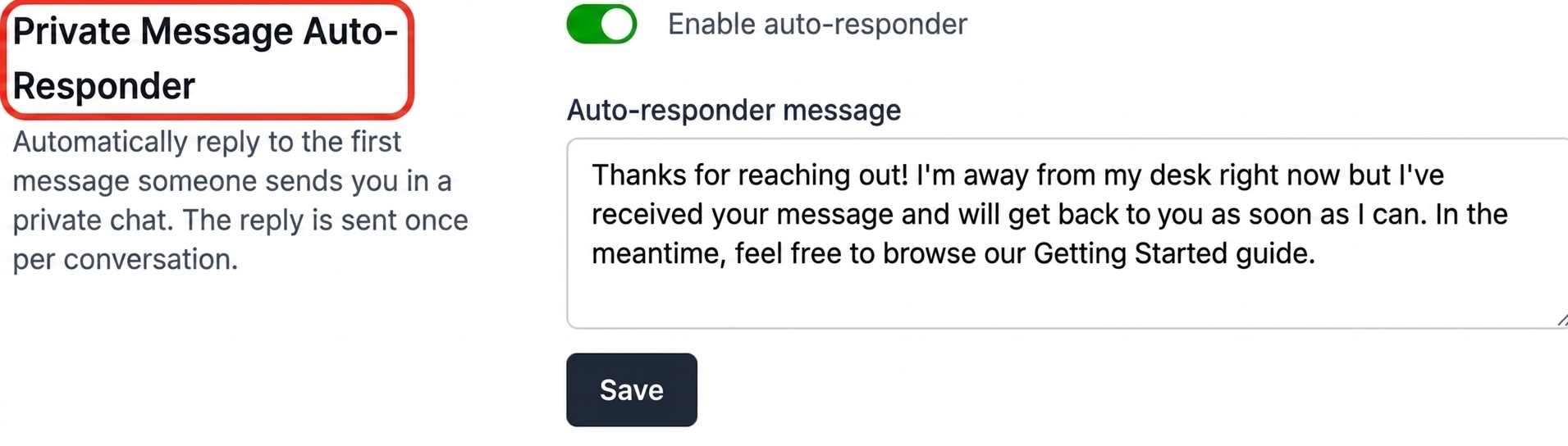
Expected Result: You see a section titled “Private Message Auto-Responder” with an on/off toggle and a message box.
Enabling the Auto-Responder
Objective: Turn the auto-responder on and write the reply that will be sent to people who message you.
- Click the Enable auto-responder toggle so it turns green.
- In the Auto-responder message box, type the reply you want to send automatically. You can write up to 1,000 characters.
- Click Save.
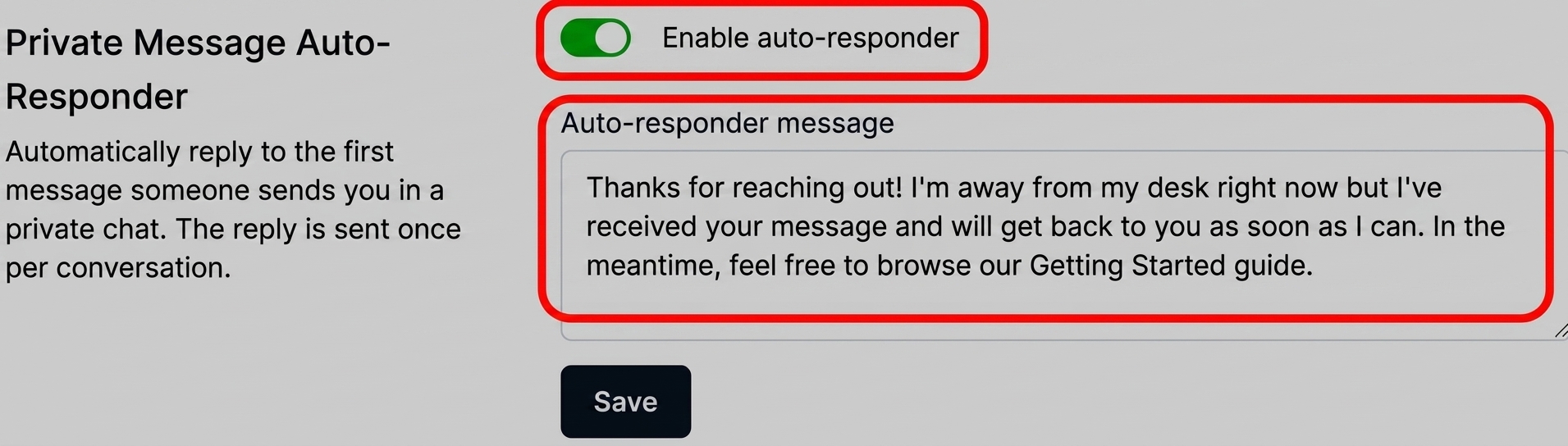
Expected Result: A “Saved.” confirmation appears next to the Save button, and your auto-responder is now active.
Pro Tip: You must enter a message before you can turn the auto-responder on — saving with an empty message and the toggle enabled will show an error. Write your message first, then flip the switch.
How It Works
Once enabled, the auto-responder replies automatically to the first message anyone sends you in a private chat. A few details worth knowing:
- One reply per conversation. The auto-responder sends its message a single time per conversation — the first time someone reaches out. It won’t repeat itself on every follow-up message in that same thread.
- A natural short pause. The reply is sent after a brief delay rather than instantly, so it reads like a genuine response instead of a robotic echo.
- It respects your real replies. If you’ve already replied to that person yourself in the conversation, the auto-responder stays quiet.
- It only reacts to incoming messages. Starting a conversation yourself, or sending the first message, never triggers your own auto-responder.
- Members and guests alike. Whether a registered member or a guest visitor opens the private chat with you, they’ll receive your automatic reply.
- Private chats only. The auto-responder applies to one-on-one private conversations, not group or room chats.
Turning It Off (Without Losing Your Message)
Objective: Pause the auto-responder when you’re back and available.
- Return to the Private Message Auto-Responder section of your profile.
- Click the Enable auto-responder toggle so it turns grey.
- Click Save.
Expected Result: The auto-responder stops sending replies. Your saved message is kept, so you can switch it back on later without retyping anything.
Pro Tip: Because your message is preserved when disabled, you can keep a polished “away” reply ready year-round and simply toggle it on whenever you step away.
Tips & Best Practices
- Set expectations, don’t just acknowledge. A message like “Thanks — I typically reply within a few hours” is far more helpful than a bare “Got it.”
- Point people somewhere useful. Link them to a getting-started guide, an FAQ, or a support channel so they can help themselves in the meantime.
- Keep it warm and brief. A short, friendly note reads best. Remember the reply is one-time, so you don’t need to cram everything into it.
- Remember to turn it off. Since it stays on until you disable it, make a habit of switching it off when you’re actively available so people aren’t told you’re away when you’re not.
Summary
The Private Message Auto-Responder is a simple way for chat moderators to stay responsive even when they’re away. Enable the toggle, write a friendly message, and WisePub will automatically greet anyone who opens a private conversation with you — once per conversation, after a natural short pause, and only when you haven’t already replied yourself. When you’re back, flip the switch off; your message stays saved for next time.
Related Features
- Chat Moderation in WisePub – The moderator toolkit for managing conversations, including the private chats your auto-responder replies to.
- How to Enable or Disable Chat Moderation – Control who has the moderation privileges required to use the auto-responder.
- How to Create a Room for Chat and/or Streaming – Set up the chat spaces where members and guests will reach out to you privately.